Screenshot generator for iPhone Duo
Preset sizes for the outer and the inner display, portrait and landscape. Free export, no watermark, no sign-up.
Drop up to 10 screenshots here
PNG, JPEG or WebP. Your files stay in this browser.
Style
Targets
Layout
Each size adapts automatically. Untick the box above to set a layout for the current size only.
Text
About your app (for AI headlines)
One credit covers a set of up to 10 slides.
Headlines, translation and AI backgrounds are not switched on yet. The editor and every export work now, and nothing here costs credits.
Something went wrong.
Background
Uses your two colours. Abstract only: no devices, people, logos or text.
Frame
Generic frames are plain rounded slabs. Google Play presets default to no frame.
Only use bezel files you're licensed to use. Apple's bezels are licensed to Apple Developer Program members for marketing their own apps. Your file stays in your browser.
Languages
One credit per language. Each language exports into its own folder. Language list not verified against Apple's page.
Export
Your project autosaves in this browser.
Add a screenshot to export. PNG without transparency, as both stores require.
iPhone Duo screenshot sizes
iPhone Duo has two displays, so App Store Connect has two new screenshot sizes. The generator opens on the inner display; switch tabs to preview the outer one. Both are ticked for export by default on this page.
| Display | Portrait | Landscape |
|---|---|---|
| Outer display | 1398 × 2034 | 2034 × 1398 |
| Inner display | 2007 × 2853 | 2853 × 2007 |
Verified on 17 Oct 2026 · Source: Apple, Screenshot specifications. Every other Apple size is in the App Store screenshot sizes guide.
Example: the same slide on both displays
Slide 2 of one project, exported for the inner and the outer display. The headline, frame and screenshot are placed again for each size rather than scaled from one master.
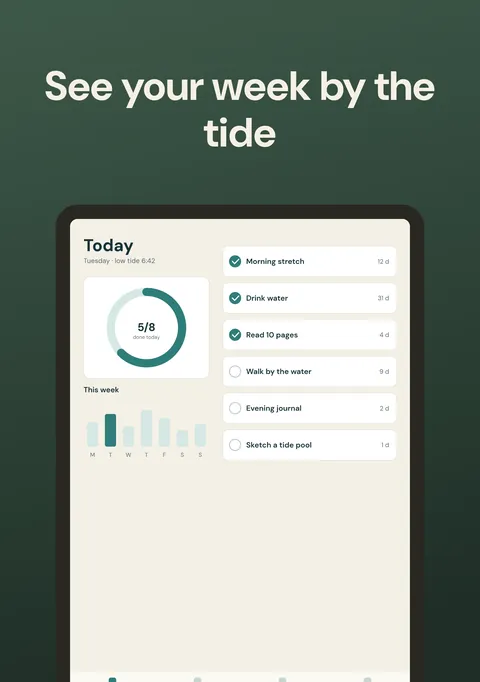 Inner display · 2007 × 2853
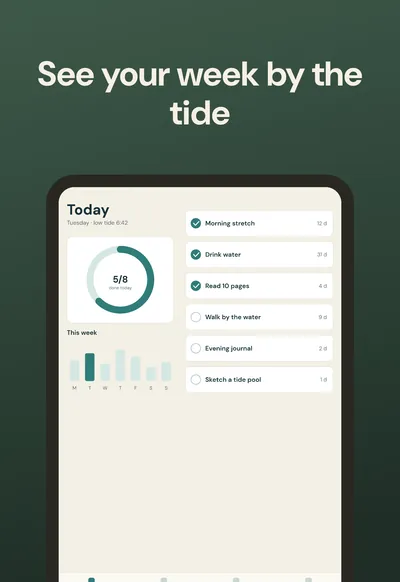 Outer display · 1398 × 2034
Why Duo screenshots need their own layout
Both Duo displays are much squatter than a regular iPhone screen. A layout that works at 1206 × 2622 leaves too little height for the device once it is moved to a Duo canvas, so the generator computes the caption area, the frame size and the headline size for each export size separately.
| Size | Pixels | Width ÷ height |
|---|---|---|
| iPhone Duo inner display | 2007 × 2853 | 0.70 |
| iPhone Duo outer display | 1398 × 2034 | 0.69 |
| iPhone 6.9″ | 1320 × 2868 | 0.46 |
| iPhone required size | 1206 × 2622 | 0.46 |
Ratios calculated from Apple's listed sizes, rounded to two decimals.
Before you upload iPhone Duo screenshots
- One set for the inner display and one for the outer display; Apple lists them as separate sizes.
- 1 to 10 screenshots per size, JPEG or PNG, no transparency. Every export from this page is flattened, so it has no alpha channel.
- Landscape (2853 × 2007 and 2034 × 1398) only if you want it. Tick “Also export the other orientation” to get both.
- Put the screens that explain your app best first; the order in the ZIP follows the slide order.
What Apple says about the deadline
“Starting in April 2027, screenshots will be required for any app using the iOS 27.1 SDK or later.”Apple, Screenshot specifications
“Starting April 2027, any apps or games submitted will need to include screenshots for iPhone Duo.”Apple Developer News, October 5, 2026, Prepare and submit your apps for iPhone Duo
The two pages word the scope differently: one ties it to the iOS 27.1 SDK, the other to any app or game submitted. We quote both and do not smooth over the difference. iPhone Duo goes on sale on October 23, 2026, according to the same news post.
How to make iPhone Duo screenshots
Upload one screenshot per feature
Capture each screen at the largest size you have. The editor crops it to fill the device frame at every target size, so start from the inner display if you can.
Check both displays
Use the size tabs to preview the inner and the outer display. The inner display is a little wider (about 0.70 against 0.69, width divided by height), so captions that fit one usually fit the other, but check each preview.
Export all four sizes
Tick portrait and landscape for both displays. The ZIP puts them in folders such as app-store/iphone-duo-inner-portrait/01.png.
Questions
Which screenshot sizes does iPhone Duo need?
Apple lists four sizes: outer display 1398 × 2034 (portrait) and 2034 × 1398 (landscape), inner display 2007 × 2853 (portrait) and 2853 × 2007 (landscape). They come from Apple's screenshot specifications, verified on 17 Oct 2026.
When do I have to submit iPhone Duo screenshots?
Apple's specification page says: “Starting in April 2027, screenshots will be required for any app using the iOS 27.1 SDK or later.” Apple's news post of October 5, 2026 words it differently: “Starting April 2027, any apps or games submitted will need to include screenshots for iPhone Duo.” Read both pages and check them again before you plan.
Do I need both the outer and the inner display?
Apple lists them as two separate display sizes, so you export a set for each. The generator exports both at once from the same slides, and you can change the layout for one size without touching the others.
What is the optimized for iPhone Duo badge?
Both Apple pages say that submitting iPhone Duo screenshots shows an “optimized for iPhone Duo” badge on your product page.
Can I reuse my iPhone 6.9″ screenshots for iPhone Duo?
Not as they are. A 1320 × 2868 screenshot is about 0.46 wide per unit of height; the Duo sizes are about 0.69 and 0.70. App Store Connect expects the listed pixel sizes, so a tall image would need cropping or padding. Here the same slides are laid out again for each Duo size, and your app screenshot is cropped to fill the Duo frame, so check the crop in the preview.
Which screenshot should I capture for the Duo sizes?
A capture from the inner display (2007 × 2853) fits both Duo sizes with very little cropping, because the two displays have almost the same proportions. A capture from a regular iPhone loses part of its top and bottom.
Is it really free?
Yes. The editor and every export (all sizes, PNG or JPEG, one ZIP) are free, with no watermark and no sign-in. Only the optional AI features use credits, and you sign in with Google to use them.